
If you are unsure which product is best suited to your requirements, you can contact us directly for expert guidance. Share details such as your use case, environment, compatibility needs, and budget, and we will help you select the most appropriate solution.
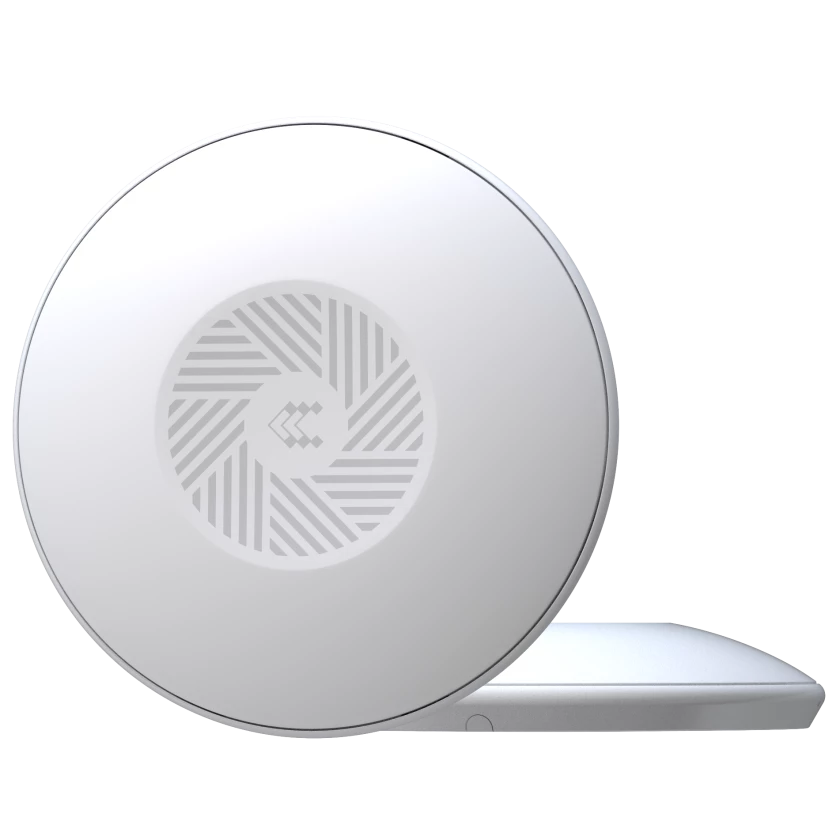

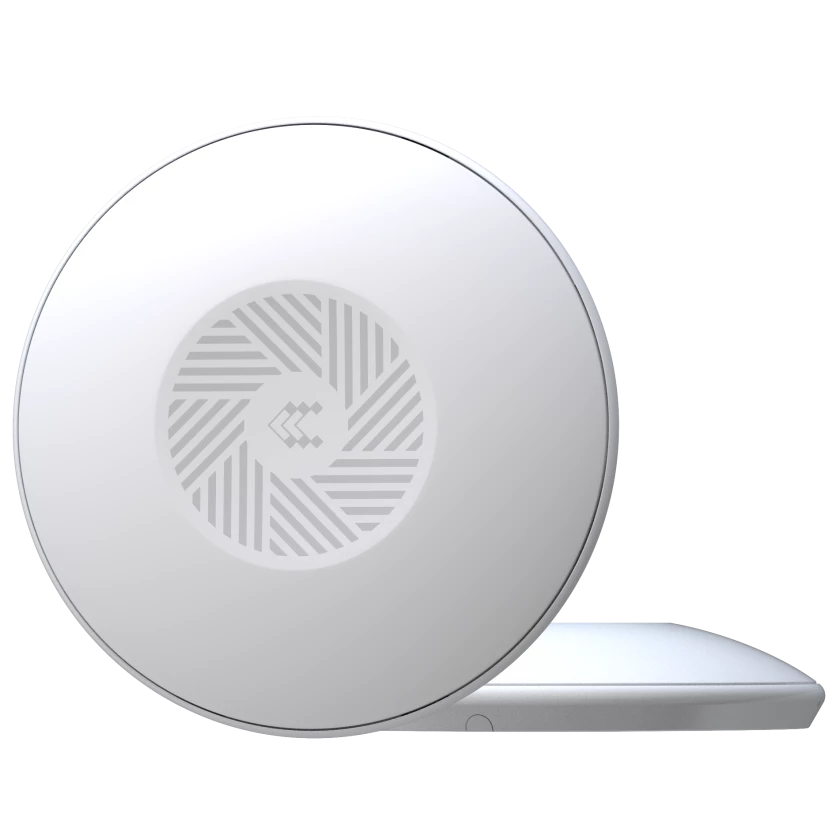
Teltonika TAP100 Wi-Fi Access Point
TAP100 is the first-ever Teltonika Networks Access Point, perfect for strengthening Wi-Fi coverage in small enterprise and commercial spaces. This PoE-in access point can be powered by active PoE devices via its RJ45 port and was designed with simplicity and ease of installation in mind.
TAP100 Features
- Can be powered by PoE devices via RJ45 port
- UV-stabilized plastic housing that blends in with its environment
- Integrated mounting bracket for easy ceiling setup
- Free access to RMS Management for 24 months
Request a Quote
Product Type
Format
Manufacturer
Country Of Manufacture
Lithuania
Wireless mode
802.11b/g/n (Wi-Fi 4)
Wi-Fi security
WPA2-Enterprise - PEAP, WPA2-PSK, WPA-EAP, WPA-PSK, WPA3-SAE, WPA3-EAP, OWE; AES-CCMP, TKIP, Auto-cipher modes, client separation, EAP-TLS with PKCS#12 certificates, disable auto-reconnect
SSID/ESSID
SSID stealth mode and access control based on MAC address
Wi-Fi users
Up to 100 simultaneous connections
Wireless Connectivity Features
Wireless mesh (802.11s), fast roaming (802.11r), BSS transition management (802.11v), radio resource measurement (802.11k)
Wireless MAC filter
Whitelist, blacklist
Wireless QR code generator
Once scanned, a user will automatically enter your network without needing to input login information.
Ethernet
1 x RJ45 port 10/100 Mbps, compliance with IEEE 802.3, IEEE 802.3u, 802.3az standards, supports auto MDI/MDIX crossover
Network protocols
TCP, UDP, IPv4, IPv6, ICMP, HTTP, HTTPS, SSL v3, TLS, ARP, SSH
DNS over HTTPS
DNS over HTTPS proxy enables secure DNS resolution by routing DNS queries over HTTPS
Hotspot
Captive portal (hotspot), internal/external Radius server, Radius MAC authentication, SMS authorisation, SSO authentication, internal/external landing page, walled garden, user scripts, URL parameters, user groups, individual user or group limitations, user management, 9 default customisable themes and optionality to upload and download customised hotspot themes
802.1x
Port-based network access control client
Authentication
SSH key based, HTTPS, CLI, IP & Login attempts block, time-based login blocking, built-in random password generator
VLAN
Tag-based VLAN separation
Protocol
HTTP(S), MQTT, Azure MQTT, Kinesis
Data to server
Extract parameters from multiple sources and different protocols, and send them all to a single server; Custom LUA scripting, allowing scripts to utilize the router's Data to server feature
Teltonika Networks Web API (beta) support
Expand your device's possibilities by using a set of configurable API endpoints to retrieve or change data. For more information, please refer to this documentation: https://developers.teltonika-networks.com
WEB UI
HTTP/HTTPS, status, configuration, FW update, CLI, troubleshoot, multiple event log servers, firmware update availability notifications, event log, system log, kernel log
FOTA
Firmware update from server, automatic notification
SSH
SSH (v1, v2)
Receive email message status alerts of various services
JSON-RPC
Management API over HTTP/HTTPS
RMS
Teltonika Remote Management System (RMS)
CPU
Mediatek, 580 MHz, MIPS 24KEc
RAM
64 MB, DDR2
FLASH storage
16 MB, SPI Flash
WEB UI
FOTA
Update FW from file, check FW on server, configuration profiles, configuration backup
RMS
Update FW
Keep settings
Update FW/configuration for multiple devices at once
Factory settings reset
Update FW without losing current configuration
Operating system
A full factory reset restores all system settings, including the IP address, PIN, and user data to the default manufacturer's configuration
Supported languages
RutOS (OpenWrt based Linux OS)
Development tools
Busybox shell, Lua, C, C++
GPL customization
SDK package with build environment provided
Package Manager
You can create your own custom, branded firmware and web page application by changing colours, logos, and other elements in our firmware to fit your or your clients’ needs
Connector
The Package Manager is a service used to install additional software on the device
Input voltage range
RJ45 Socket
PoE standards
44.0 – 57.0 V
Power consumption
802.3af PoE Class 1
Ethernet
< 2 W Max
Status LEDs
1 x RJ45 ports, 10/100 Mbps
Antennas
1 x Power LED (can be turned off from web-UI)
Antennas specifications
2 x Internal for 2.4 GHz Wi-Fi
Reset
2 x 2400 - 2500 MHz, 50 Ω, VSWR <2.7, gain < 4.9 dBi, omnidirectional
Casing material
Reboot/User default reset/Factory reset button
Dimensions
UV stabilized plastic
Weight
Ø 158 mm x 30 mm
Mounting options
190 g
Operating temperature
AP mounting bracket (for ceiling mount)
Operating humidity
-40 °C to 75 °C
Ingress Protection Rating
10% to 90% non-condensing
Regulatory
IP30
Standards
CE, UKCA, EAC, ANRT, Kenya, SDPPI (POSTEL), CB, FCC, IC, RoHS, REACH, WEEE
ESD
EN 55032:2015 + A11:2020EN 55035:2017 + A11:2020EN 61000-3-3:2013 + A1:2019 + A2:2021EN IEC 61000-3-2:2019 + A1:2021EN 301 489-1 V2.2.3EN 301 489-17 V3.2.4
Radiated Immunity
EN 61000-4-2:2009
EFT
EN IEC 61000-4-3:2020
Surge Immunity (AC Mains Power Port)
EN 61000-4-4:2012
CS
EN 61000-4-5:2014 + A1:2017
DIP
EN 61000-4-6:2014
Standards
EN IEC 61000-4-11:2020
Standards
EN 300 328 V2.2.2
The Teltonika TAP100 Wi-Fi Access Point is designed to meet the demands of various markets that require rugged, reliable products. Below are some of the key industries where the TAP100 is commonly used:
Aerospace, Marine and Offshore, Medical and Healthcare, Military and Defence, Outdoor and Mobile Computing, Public Safety and Emergency Services, Transport and Logistics
These examples highlight the versatility of the Teltonika TAP100 Wi-Fi Access Point across a range of market applications, with its potential extending far beyond the sectors listed here. For more information or to assess if this Access Point fits your specific needs, please contact us.
The Teltonika TAP100 Wi-Fi Access Point comes with a 24 Month Limited Warrany against defects in workmanship and materials, effective from the date of shipment (unless otherwise agreed in writing).
To receive service under this warranty, the eligible product, Teltonika TAP100 Wi-Fi Access Point, must be presented to RUGGED in the United Kingdom.
For more information about the Teltonika TAP100 Wi-Fi Access Point or to arrange repairs and services not covered by the warranty, please visit the warranty section on our website.
Do you need further details about the Teltonika TAP100 Wi-Fi Access Point or require a custom solution or demonstration?
At FB Peripherals, we recognise that every project has its own unique demands. If you have any questions about the Teltonika TAP100 or need a custom Access Point solution designed specifically for you, our team of technical experts are ready to assist you.
Alternative Products
Discover a range of alternatives that offer comparable features and quality to the product you’re viewing.
Our selection of similar items provides diverse options, allowing you to explore different designs, functionalities, and styles tailored to your preferences. Each product has been carefully chosen to ensure it meets the high standards you expect, enabling you to make a well-informed decision based on your unique requirements.
Browse through our related products and find the perfect match that complements your choice seamlessly.
Having trouble finding what you're looking for?
Selecting the right product for your specific application and environment can be quite challenging. At Rugged, our team of experts is on hand to assist you in making the best choice. Whether you have questions about product specifications or require guidance through our range of solutions, we’re here to help.
With our extensive industry knowledge and commitment to quality, we can ensure you find the ideal solution tailored to your needs.
Frequently Asked Questions
FB Peripherals offers free technical support for the lifetime of products you purchase. This includes help with setup, troubleshooting, and integration. Support is available online or directly from the technical team
Yes, access points can support multiple users simultaneously, making them essential for environments requiring robust wireless connectivity. Multi-user access points are designed to manage numerous device connections efficiently, ensuring stable and high-speed network performance. These devices often incorporate technologies such as MU-MIMO (Multi-User Multiple Input Multiple Output) to enhance throughput and reduce latency in busy networks. For challenging industrial or mission-critical applications, selecting ruggedised multi-user access points from a trusted supplier like FB Peripherals ensures reliable operation in harsh environments, maintaining seamless connectivity for all users.
Power over Ethernet (PoE) in an access point refers to the technology that enables both data and electrical power to be delivered over a single Ethernet cable. This eliminates the need for separate power supplies or outlets, simplifying installation and reducing costs. PoE access points are particularly useful in rugged or mission-critical environments where reliable and efficient network deployment is essential. FB Peripherals offers a range of robust PoE solutions designed for extreme conditions, ensuring continuous connectivity. For more information on our industrial networking products, visit our connectivity solutions page.
Yes, most wired access points require a wired connection to function effectively. They connect to a network via Ethernet cables, ensuring stable and high-speed data transmission, which is crucial for mission-critical and harsh environments. This wired connection also provides power through Power over Ethernet (PoE), reducing the need for separate power supplies. For industrial and rugged applications, wired access points offer reliability and performance that wireless-only solutions may not deliver. For detailed options and expert advice, visit FB Peripherals connectivity solutions, a trusted source in rugged industrial networking equipment.
An access point serves as a crucial device in wireless networking, enabling Wi-Fi devices to connect to a wired network. It extends the range of a wireless network by transmitting and receiving data between wireless clients and the wired infrastructure. This function allows multiple devices to access the network seamlessly, improving connectivity in industrial and harsh environments. At FB Peripherals, we specialise in rugged access points designed for mission-critical applications, ensuring reliable and durable network access. For more details on these solutions, visit FB Peripherals’ connectivity products.
An access point and a router serve different functions in a network. A router directs data between devices and manages internet traffic, often including firewall and DHCP services. An access point, on the other hand, primarily extends a wired network by providing wireless connectivity to additional devices. While routers create and manage networks, access points simply connect wireless devices to an existing wired network. For industrial and mission-critical environments, selecting the right networking equipment is vital. FB Peripherals offers rugged and reliable solutions, ideal for demanding applications. Explore more about connectivity options at FB Peripherals connectivity.
An access point is a networking device that allows wireless devices to connect to a wired network using Wi-Fi or related standards. It acts as a bridge between wireless clients and the network infrastructure, enabling seamless communication within a local area network (LAN). Commonly used in both commercial and industrial settings, access points extend network coverage and improve connectivity in challenging environments. For mission-critical applications requiring robust and reliable wireless solutions, FB Peripherals offers a range of ruggedised Wireless Access Points designed for harsh conditions. Learn more about their connectivity solutions at FB Peripherals Connectivity.
An access point should be used instead of a router when you need to extend the wireless coverage within an existing network without creating a new subnet or managing routing functions. Access points are ideal for expanding Wi-Fi signals in larger or complex environments, ensuring seamless connectivity and improved network performance. In contrast, routers are used to connect different networks and handle traffic management between them. For mission-critical or rugged environments, selecting the right device is crucial. For more detailed guidance on connectivity solutions, visit FB Peripherals connectivity offerings, a trusted source for industrial-grade network equipment.
Yes, many modern Access Points (APs) support Wi-Fi roaming, enabling seamless transition of devices between multiple APs within the same network. This feature is essential in maintaining uninterrupted connectivity in industrial and harsh environments. Roaming capabilities ensure that devices like rugged tablets or mobile machinery maintain strong, consistent connections without user intervention. For mission-critical applications, choosing the right AP with advanced roaming support is crucial. FB Peripherals offers a range of robust connectivity solutions designed for such scenarios. To explore suitable APs, visit FB Peripherals Connectivity.